
 | KBL Help Topic:MAIN, STORE and user NAMED Datasets |
In-memory tables
Fundamental to KBL is the ability to take complete control of your data, be it simple or highly structured. The language processes data in a deceptively simple way, think of a calculator that holds datasets in memory. In KBL there is a primary in-memory dataset, or table, called MAIN comprising columns and rows (records). Like a spreadsheet, you can have as many columns and rows as you need and it is against MAIN that most KBL commands operate. Data read into MAIN may be just 10s or 100s of rows with one or two columns. However, there's no maximum number of rows or columns that KBL can hold other than the physical restrictions of machine memory available in your PC. Typically, a standard PC with average memory of a few Gb can, if needs be, will support millions of rows of data in MAIN but it also depends on the number and size of columns. If you are interested in Very Large Data (VLD) Click here
If you are familiar with Spreadsheet worksheets then you will soon be at home with the principles of KBL and its in-memory working tables
Once data is created or imported into MAIN, KBL's command vocabulary can be used to manipulate and work on it. Note that the contents of MAIN can be viewed at any time by clicking Studio's MAIN menu icon or displayed by a command in your script We'll soon come on to commands for adding and subtracting rows and columns, manipulating data with business logic.
MAIN is supplemented by a secondary working area called the STORE table into which a copy can be made of all or parts of the data in MAIN. You can carry on working with MAIN and then STORE data can then be restored, appended, merged and other dataset functions applied to return data into MAIN.
For script simplicity and for more complex tasks, the user can easily create additional NAMED "user-defined" Tables, the data in which can be copied back to MAIN or used in some more specialist commands.
Some Basic Commands
STORE Copy the data in MAIN into STORE (overwrites any existing data)
RESTORE Copy the data in STORE into MAIN (overwrites any existing data)
STORE MYTAB1 Copy the data in MAIN into the user defined table MYTAB1
RESTORE MYTAB1 Copy the data in MYTAB1 into MAIN
DELETE /TAB MAIN Clear the data in MAIN
The TAB (Table) Command family are designed to operate primarily (though not exclusively) on the MAIN table and comprise commands that manipulate and analyse Column data and rows. This gives the KBL user extensive control over datasets with facilities for maths, stats, graphical, and character string manipulation. You can create and load as many virtual tables as you need and populate them from different data sources. Likewise, you can edit, manipulate, present and export data and If you wish, hold "relationa'" structure in memory (inter-related datasets).
Parametric data
Whereas MAIN, STORE and NAMED tables hold n x n data values, KBL parameters hold just one single element of data, however, data elements in tables can be moved into parameters and vice versa. A parameter could be a simple integer or decimal number, or text value but it could also be a text string 100s, 1000s or much higher numbers of characters long. For more information on parameters click here.
Handling Data
The following diagram illustrates how data imported into MAIN can be worked on and moved selectively between different tables
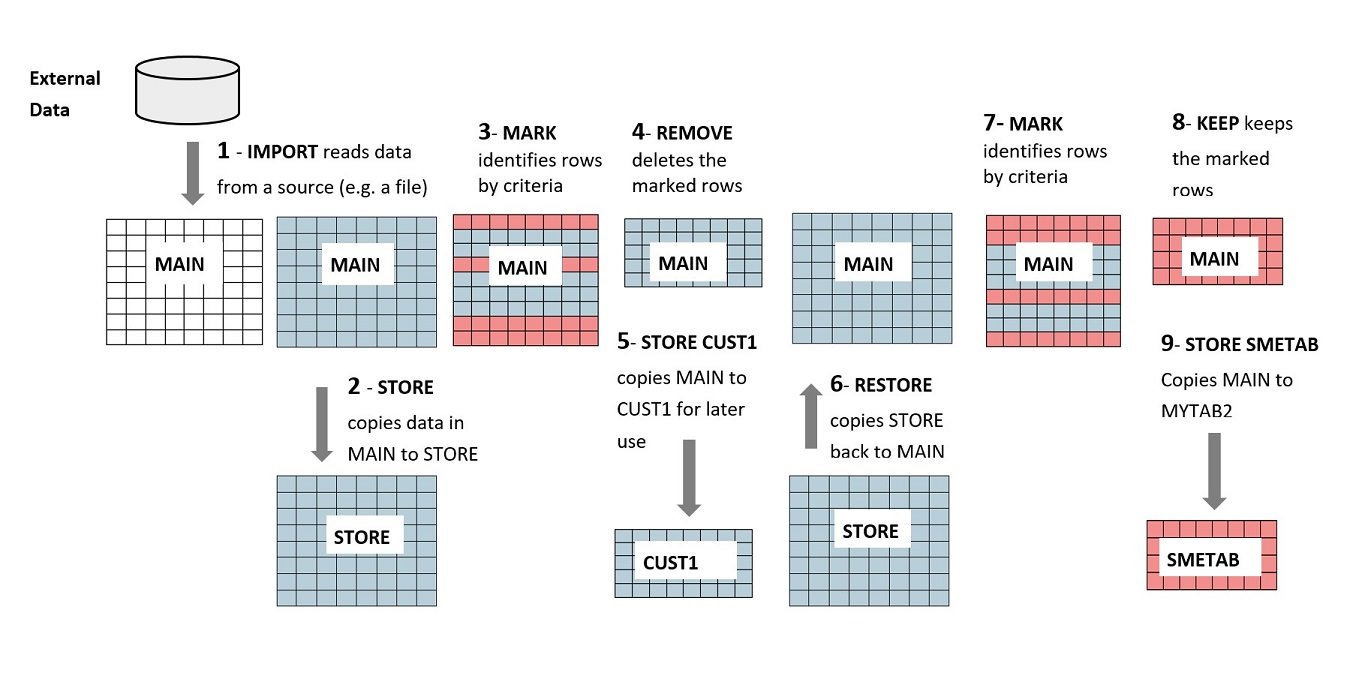
Step 1 IMPORT data (e.g. from a spreadsheet or other file type)
Step 2 STORE (copy it to STORE)
Step 3 MARK Identify certain rows via a column criteria (e.g. Customers who are SMEs)
Step 4 REMOVE the SME customer Rows
Step 5 STORE CUST1 copy the non-SME customers in a table called CUST1
Step 6 RESTORE, refreshes MAIN with the original data
Step 7 MARK - identify rows with a certain column value (e.g. SME customers)
Step 8 KEEP - Keep these records (delete rows that are not SMEs
Step 9 STORE SMETAB - copy the SME customers into SMETAB
in real life, this would be an unlikely sequence of processes but it serves to illustrate how you can manipulate the data by copying, editing, saving and restoring data between virtual tables. The next part of this logic might be to import customer orders data and merge it with SME customers, roll-up order values by customer and export a report. This is simple logic easily dealt with in KBL that only requires a very limited selectio of the TAB command set.